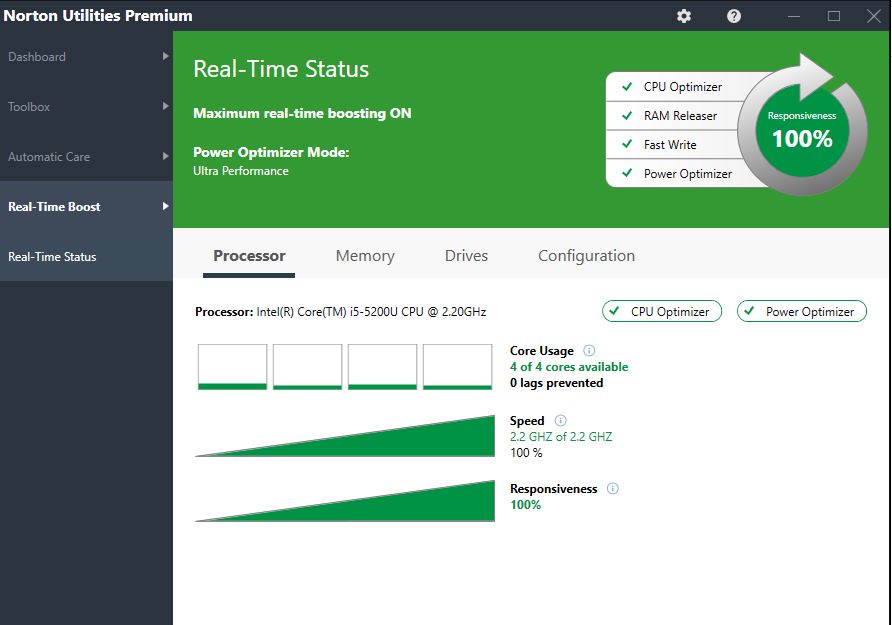
Automatically optimizes your PCs processing power, memory and hard drive when you launch high-demand apps to help give you a smoother gaming, editing and streaming experience
Nothing is more frustrating than having a sluggish PC. Norton Utilities Premium helps you automatically optimize your PC’s processing power, memory and hard drive when you launch high-demand apps. It also helps fix common issues and frees up space to provide faster access to the programs you want, when you want them. In addition, Norton Utilities Premium helps you maintain your digital privacy by enabling you to erase browser file downloads and helps you permanently dispose of personal documents. At last, there’s an easy way to help increase and maintain your PC’s performance.
Features of Norton Utilities Premium :
View any issues detected by Norton Utilities Premium and decide which ones you want to fix.
Enable Automatic Care to perform the automated housekeeping tasks that you specify.
Remove performance drains and adapt settings to boost PC and web speed.
Defragment hard drives to improve performance and extend the life of drives.
Erase temporary and other junk files to reduce clutter and increase drive capacity.
Delete the cookies and other tracking data that endanger your privacy.
Optimize your CPU, RAM, and drives in real-time.
Customize the behavior of Windows features.
New Tools and Features in Norton Utilities Premium
Consolidated toolset is the easiest to use and has the smallest footprint of any version yet.
Re-architected Startup Optimizer finds whole new categories of unneeded bloatware to prevent from launching at startup. This tool also now has separate, focused wizards to offer full control over Unnecessary, Dangerous and User Choice startup items.
Next-generation Tune-up Definitions are capable of continuous updates that find many effective new optimizations for modern apps.
Norton Smart Updater delivers regular, nearly instantaneous updates for far more frequent product enhancements.
New software platform optimizes your PC many times faster by scanning and repairing multiple areas at once.
Norton Utilities Premium is Your One Stop PC Performance Suite. Optimize your PC with Norton. Download Norton Utilitiesand start optimizing your PC's performance now!
How do I install Norton Utilities?
Before you install Norton Utilities Premium, uninstall any other previous version of Norton Utilities Premium you have installed. Ensure that your computer is connected to the Internet. You need to sign in to your Norton account to download and install Norton Utilities Premium.
Sign in to your Norton account.
In the Subscriptions page, under Norton Utilities Premium, click Download.
Click Agree & Download. You must read and accept the license agreement to install Norton Utilities Premium.
Click on the area pointed by the on-screen arrow and follow the on-screen instructions.
Wait for a few minutes as your product gets downloaded, installed, and activated.
If you are prompted for activation, enter the product key as it appears in the Subscriptions page. Type all letters and numbers, exactly as shown. The hyphens will be automatically entered.
Norton Utilities Premium Dashboard
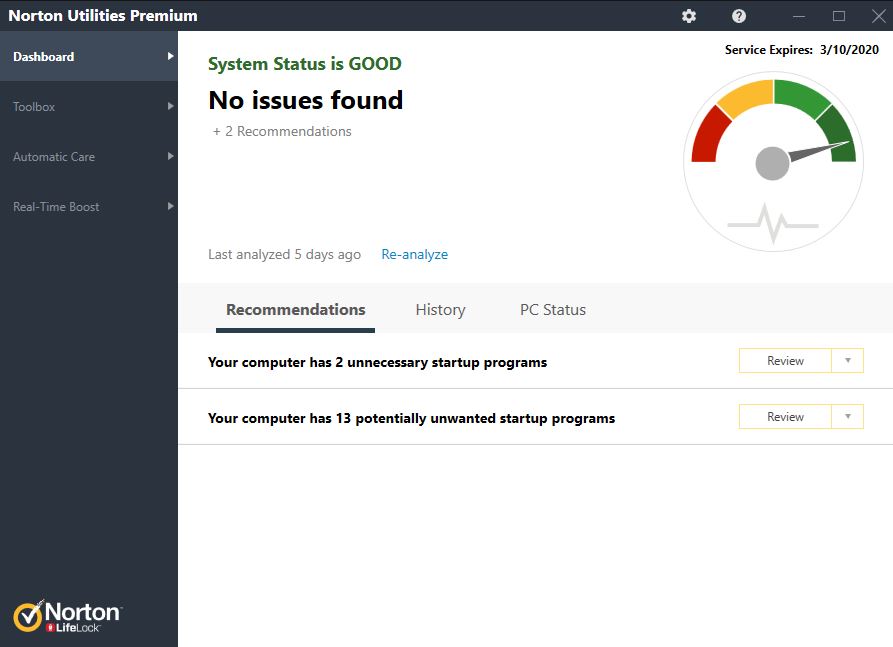
Norton Utilities Premium Dashboard displays a summary of last system analysis that was performed on your computer. It notifies you about the problems if it detects any. The Dashboard resets after one hour of carrying out the last system analysis and recommends a new system analysis.
The Norton Utilities Premium Dashboard provides you the following information:
Recommendations: Offers recommendations to increase your computer performance
History: Displays the changes that Norton Utilities Premium has recently made after a system analysis has been done on the computer
PC Status: Displays information on how hard drive and memory resources are being used, as well as programs that launch at startup and currently running programs
Norton Utilities Premium helps you automatically optimize your PC’s processing power, memory and hard drive. It fixes common issues and frees up space to provide faster access to the programs you want, when you want them.
Automatically optimizes your PC for better performance
Automatically optimizes your PC’s processing power, memory and hard drive when you launch high-demand apps to give you a smoother gaming, editing and streaming experience
Automatic Care automates the maintenance of your PC
Cleans and helps speed up your PC by fixing common issues that can cause frustrating slowdowns or crashes
Startup Optimizer identifies and helps you remove unwanted startup programs that slow you down. This tool has separate, focused wizards to offer full control over unnecessary, potentially dangerous and optional startup items
Frees up space on your hard drive to allow you faster access to programs
Profiles help you choose the level of performance you need based on your task–get ultra-high CPU output when you need it, or conserve energy when you don’t
Maintains your digital privacy
Helps to securely dispose of personal documents for good while preventing others to access them
Keeps your PC Healthy
Norton Utilities Premium automatically delivers regular enhancements with the most up-to-date list of programs that can slow down your PC
Run an analysis of your PC and see a snapshot view of your computer's condition
System Dashboard shows you step-by-step how to get your computer to run like new again
Next-generation tune-up definitions provide continuous updates to optimize performance
Automate the optimization of your CPU, RAM, and storage drives
Uses your PC idle time to automatically update and optimize system functions, keeping your PC running like new, so it won’t slow you down
Easy to use interface lets you perform 1-Click Optimization for your PC
Lets you designate the issues you want Norton Utilities Premium to monitor and automatically repair
Norton Utilities Premium benefits
Application AcceleratorWith one click you can clean and help speed up your PC and fix common issues that can cause frustrating slowdowns or crashes
Automatic Cleanup Automatically optimizes your PC for better performance by removing browser history or junk files
Community-based recommendations Based on aggregated user community information, the program automatically identifies rarely or never used programs to help you determine what unwanted startup programs might be slowing you down so these can be removes with confidence.
CPU Optimizer To help give you a smoother gaming, editing and streaming experience, CPU Optimizer automatically optimizes your PC’s processing power, memory and hard drive when high-demand apps are launched
Disk Defragmentation
Helps make your PC run like new again
Helps increase the speed of your PC so it runs like new again by grouping your files for faster retrieval and processing
File Shredder
Helps to securely disposes of personal documents while preventing others to access them
Shreds files you want to delete so they are difficult to retrieve.
Performance Profiles Once enabled, it helps boost your PC performance by allowing the machine to prioritize performance over battery life or vice versa.
Seat Count Up to 10 PCs
Start-up Optimizer Let’s you get to work faster by helping you select which programs to run when you start up your system
Blocks bloatware at startup to accelerate boot time and improve system performance. Potentially dangerous programs are automatically disabled at startup.
Based on user community reputation information, information is provided about programs that can slow your computer down. Users can choose to disable these programs for better performance. However, anything listed as dangerous is automatically disabled.
System Dashboard Provides step-by-step guidance on how to get your computer to run like new again
Temp Files, Junk Files Remover Users can schedule regular scans to identify temporary and junk files to be removed from your system
Tune-up Definitions
Regularly updates information on programs that may cause PC slowdown
Enjoy comprehensive PC performance improvements with daily updates
Norton Utilities Premium PC Cleaner Microsoft Windows 7 and Microsoft Windows 8/8.11,2
CPU: 1 GHz
Memory: 1 GB for 32-bit, 2 GB for 64-bit
Microsoft Windows 101 Additional Hardware Requirements
100 MB of available hard disk space
SVGA (1024 x 768) video
CD-ROM or DVD drive (if not installing via electronic software download)
Internet connection (to activate product and receive product updates)3
1 Must meet the minimum operating system requirements for Windows 7, Windows 8/8.1 and Windows 10. Windows 10S is not supported
2 Product features do not work in Windows 8 Start screen mode.
3 User is responsible for Internet service provider account, all Internet access fees and phone charges.
Your subscription begins when your purchase is completed (or otherwise, when your payment is received). You must download and install on each device, or complete enrollment to get protection.
By subscribing, you are purchasing a recurring subscription which will automatically renew after the first term.
The price quoted today is valid for the first term of your subscription. After that, your subscription will be billed at the applicable monthly or annual renewal price here. The price is subject to change, but we will always send you a notification email in advance.
Your subscription may include product, service and/or protection updates and features that may be added, modified or removed subject to the acceptance of the Customer Agreement by NortonLifeLock Inc.
The number of supported devices allowed under your plan are for personal or household use only. Not for commercial use. If you have issues adding a device, please contact Member Services & Support.